
Empowering 22K+ merchants to effortlessly bill customers and collect payments.

Empowering 22K+ merchants to effortlessly bill customers and collect payments.

A case study on simplifying invoicing for Merchant

A case study on simplifying invoicing for Merchant

Lead Designer

Lead Designer

2024

2024

7 min read

7 min read

8 Weeks

8 Weeks

Badge of service

Badge of service

My Role & Collaboration

My Role & Collaboration

Led UX research and design to create an intuitive invoicing system.

Led UX research and design to create an intuitive invoicing system.

Worked with PM, Engineers, Content designer and UX researcher to align business goals with user needs.

Worked with PM, Engineers, Content designer and UX researcher to align business goals with user needs.

Used Data & usability test to refine the final design

Used Data & usability test to refine the final design

Getting started

Getting started

Merchant success is out upmost priority

Merchant success is out upmost priority

Hydrogen's North Star; TTV (Total Transaction Value) hits $32B in 2024 from $7.5B in 2023. Driven by our commitment to merchant success, it became important for us to create features that empower merchants to bill customers and collect payment, creating greater value and expanding opportunities.

Hydrogen's North Star; TTV (Total Transaction Value) hits $32B in 2024 from $7.5B in 2023. Driven by our commitment to merchant success, it became important for us to create features that empower merchants to bill customers and collect payment, creating greater value and expanding opportunities.

Users

Users

Target Audience

Target Audience

Freelancers & Solopreneurs
Small & Medium-Sized Businesses (SMBs)
Large Enterprises & Corporate Finance Teams
Service-Based Businesses
E-commerce & Retail Businesses
Contractors & Gig Workers

Freelancers & Solopreneurs
Small & Medium-Sized Businesses (SMBs)
Large Enterprises & Corporate Finance Teams
Service-Based Businesses
E-commerce & Retail Businesses
Contractors & Gig Workers

Research & Discovery

Research & Discovery

Validating the why

Validating the why

Partnered with our UX Research team to identify the challenges our merchants faces in billing their client.

Partnered with our UX Research team to identify the challenges our merchants faces in billing their client.

I need something professional that represents my brand.

Reconciling hundreds of

invoices eats up hours.

Manual Excel invoices waste

time and cause errors.

I can’t see my sales history

with payment links.

Our invoicing tool doesn’t talk to our payment system.

Manual workflows make us

look outdated.
Research & Discovery

Research & Discovery

Competitive Analysis

Competitive Analysis

Research & Discovery

Research & Discovery

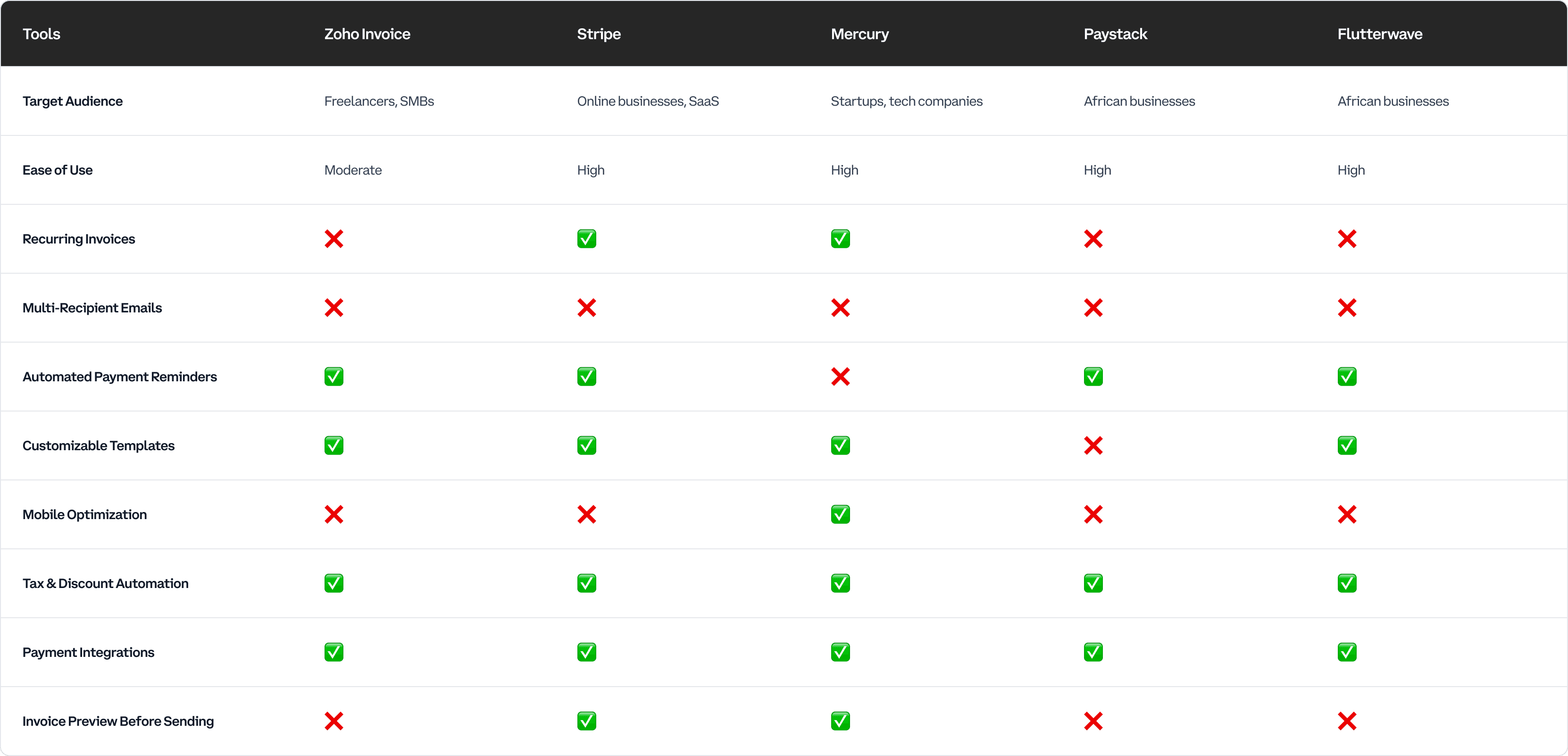
Key Insights from Competitive Analysis

Key Insights from Competitive Analysis

Traditional invoicing solutions (QuickBooks and Zoho) are either too complex or too basic for SMBs and freelancers.

Traditional invoicing solutions (QuickBooks and Zoho) are either too complex or too basic for SMBs and freelancers.

Freelancers and SMBs need a tool that is simple yet powerful, mobile-optimized, and flexible enough to handle recurring payments and tax calculations.

Freelancers and SMBs need a tool that is simple yet powerful, mobile-optimized, and flexible enough to handle recurring payments and tax calculations.

Stripe and Mercury focus on payments but lack bulk invoicing and multi-recipient support, making them unsuitable for enterprises.

Stripe and Mercury focus on payments but lack bulk invoicing and multi-recipient support, making them unsuitable for enterprises.

African-focused solutions (Paystack, Flutterwave, Monnify) integrate well with local payment systems but lack advanced invoicing features like customization and automation.

African-focused solutions (Paystack, Flutterwave, Monnify) integrate well with local payment systems but lack advanced invoicing features like customization and automation.

Key Objectives

Key Objectives

High level goals

High level goals

Upon thorough analysis of the interviews and the abundance of data generated, the following key insights emerged as the most relevant information to guide the decision-making process in creating the solution.

Upon thorough analysis of the interviews and the abundance of data generated, the following key insights emerged as the most relevant information to guide the decision-making process in creating the solution.

Simplify Invoice Creation by Reducing Unnecessary Steps

A streamlined three-step process eliminates redundant data entry, making invoice creation faster and more intuitive.

Automate repetitive tasks like recurring invoices and tax calculations

Recurring invoices and automated tax calculations reduce manual effort, ensuring accuracy and efficiency.

Ensure Flexibility for Solopreneurs, SMEs and Large Enterprises

A scalable system adapts to simple invoicing needs for freelancers while supporting advanced features for enterprises.

Enhance Mobile Usability for Invoicing on the Go

A mobile-optimized experience allows users to create, send, and track invoices anytime, anywhere.

Aproach

Aproach

Fueled by curiosity, we rapidly tested ideas to discover what works and refine what doesn’t. Iterated swiftly to uncover intuitive, efficient interfaces that streamline workflows and boost user adoption.

Strategy

Strategy

Designed an adaptive, payment-first invoicing flow that decouples setup from creation, reveals only context-critical inputs, and automates defaults, validation, and reconciliation, optimizing time-to-invoice and successful payment volume

Designed an adaptive, payment-first invoicing flow that decouples setup from creation, reveals only context-critical inputs, and automates defaults, validation, and reconciliation, optimizing time-to-invoice and successful payment volume

Invoice Details

#1

Select customer from pre-added contacts or add a new one.
Choose products/services with quantity and unit price.
Auto-calculate total based on pricing and tax settings.

Payment Details

#2

Set due date for payment.
Enable recurring invoices for subscriptions or repeat billing.
Add payment notes (e.g., bank details, terms, or additional instructions).

Review & Send

#3

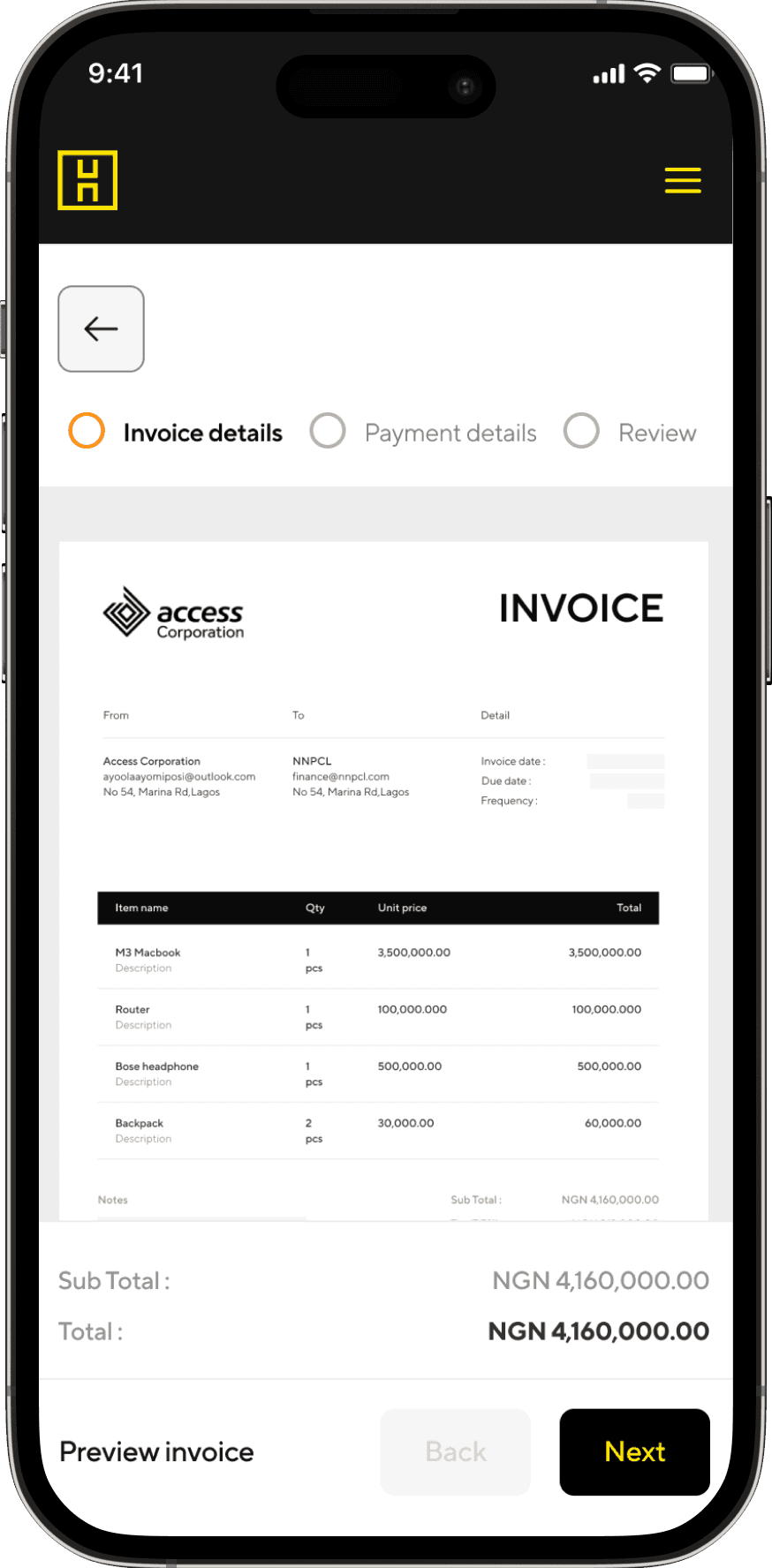
Review invoice details for accuracy.
Add multiple email recipients (e.g., finance teams, accountants).
Send via email or generate a shareable PDF link.

Design

Design

Userflow

Userflow

Constructing Solutions

Constructing Solutions

Design Approach

Design Approach

1

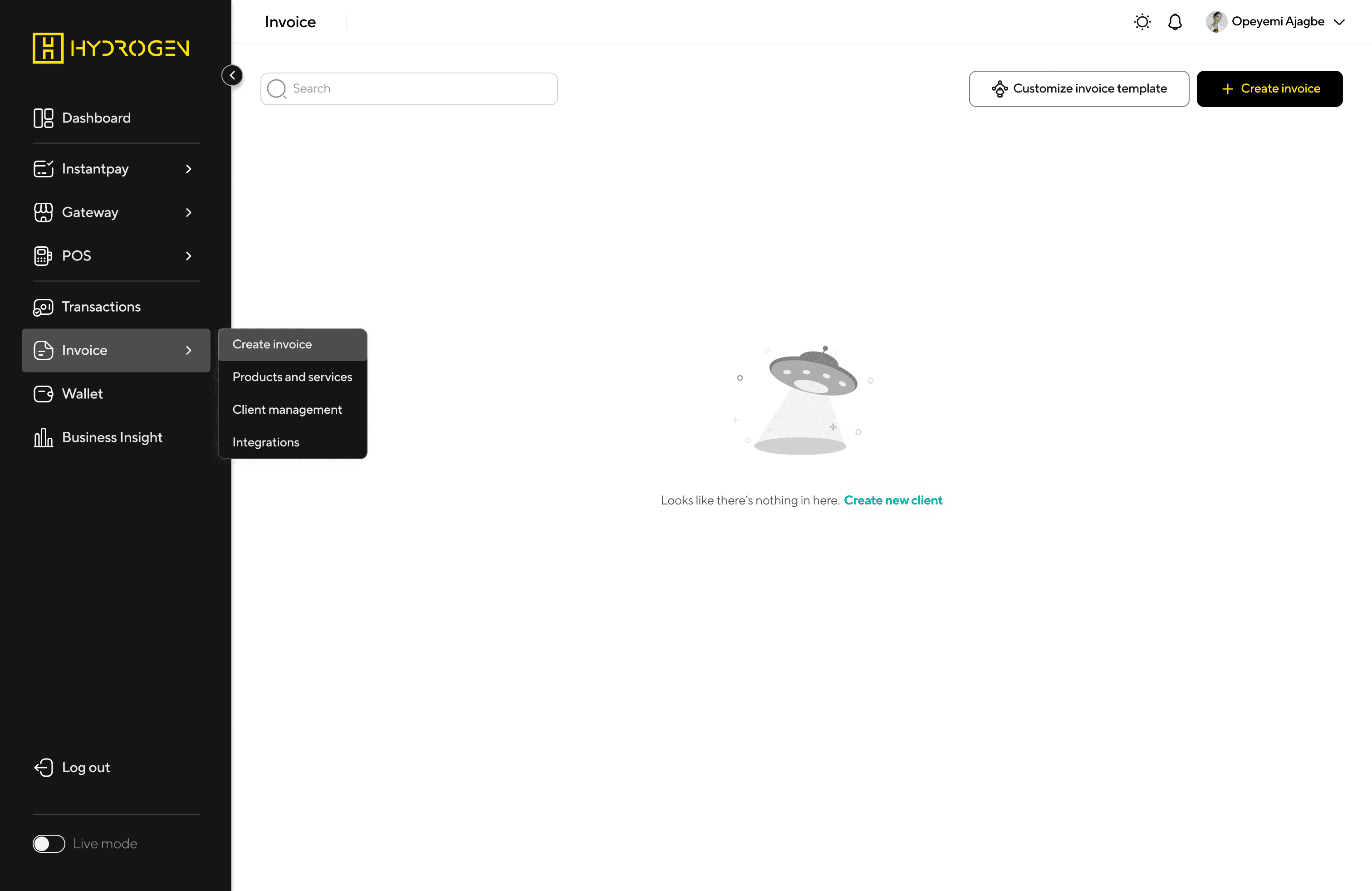
Dashboard - Empty state

Dashboard - Empty state

Minimalist & friendly empty state with a call-to-action (CTA): “Create invoice.”
Quick access buttons to Import invoices, View reports, or Manage clients/products for enterprise users.
Tooltips or onboarding prompts for first-time users to reduce friction.

Minimalist & friendly empty state with a call-to-action (CTA): “Create invoice.”
Quick access buttons to Import invoices, View reports, or Manage clients/products for enterprise users.
Tooltips or onboarding prompts for first-time users to reduce friction.

2

Dashboard - Filled State

Dashboard - Filled State

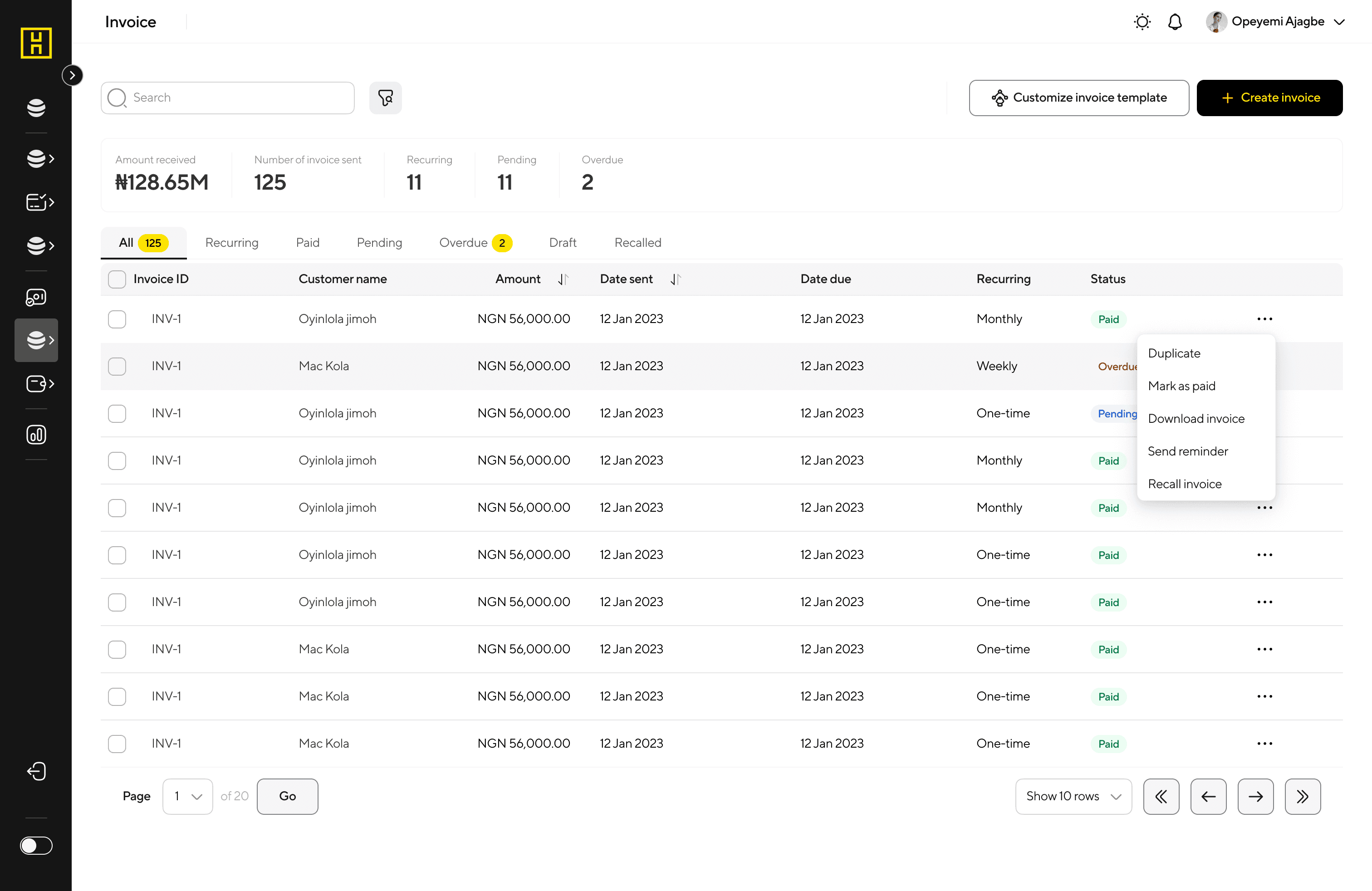
Tabular layout with columns for Invoice #, Client Name, Status, Amount, Due Date, Actions.
Status indicators with color coding:

Tabular layout with columns for Invoice #, Client Name, Status, Amount, Due Date, Actions.
Status indicators with color coding:

3

Invoice Details Screen

Invoice Details Screen

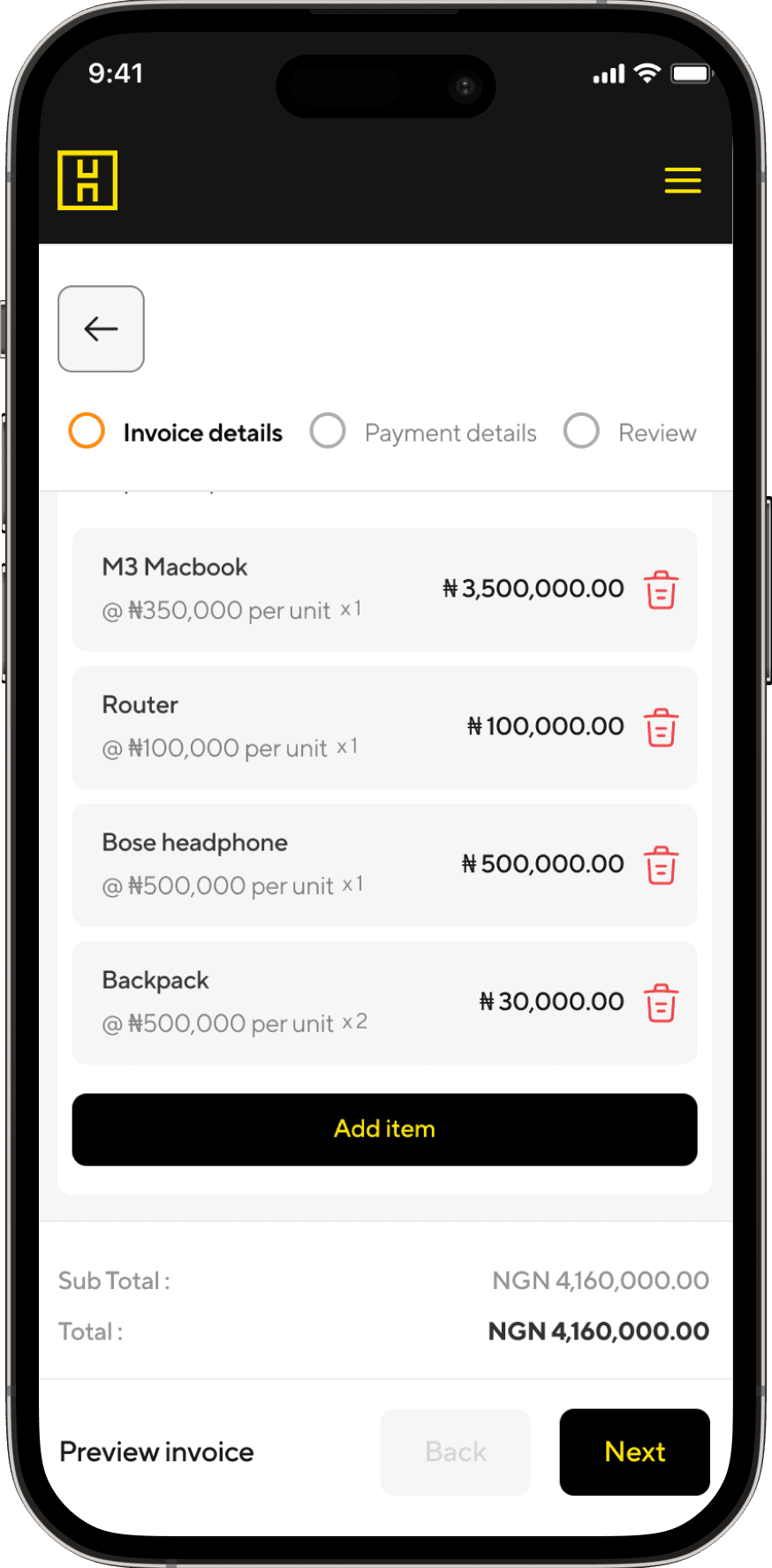
Allows users to select a customer and add products/services to the invoice.

Allows users to select a customer and add products/services to the invoice.

4

Invoice Details Screen

Invoice Details Screen

5

Invoice Details Screen

Invoice Details Screen

6

Payment details

Payment details

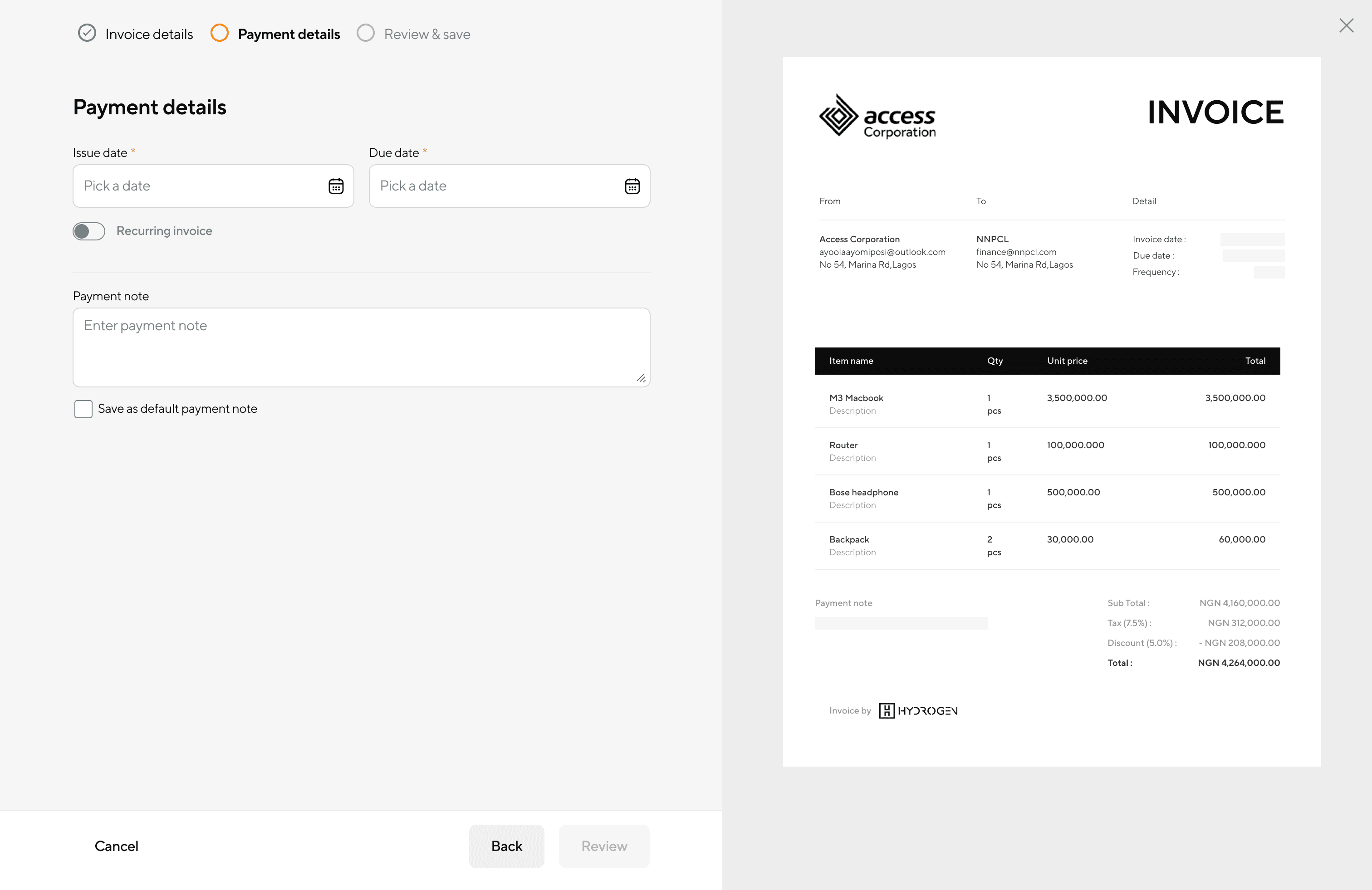
Users set due date, recurring options, and payment notes to define payment terms.

Users set due date, recurring options, and payment notes to define payment terms.

7

Payment details - Recurring invoice

Payment details - Recurring invoice

Toggle switch for “Recurring Invoice” (expands to show frequency options).

Toggle switch for “Recurring Invoice” (expands to show frequency options).

8

 Review & Send

 Review & Send

• Provides users a final look at the invoice before sending.
• Allows users to add multiple recipient emails.

• Provides users a final look at the invoice before sending.
• Allows users to add multiple recipient emails.

9

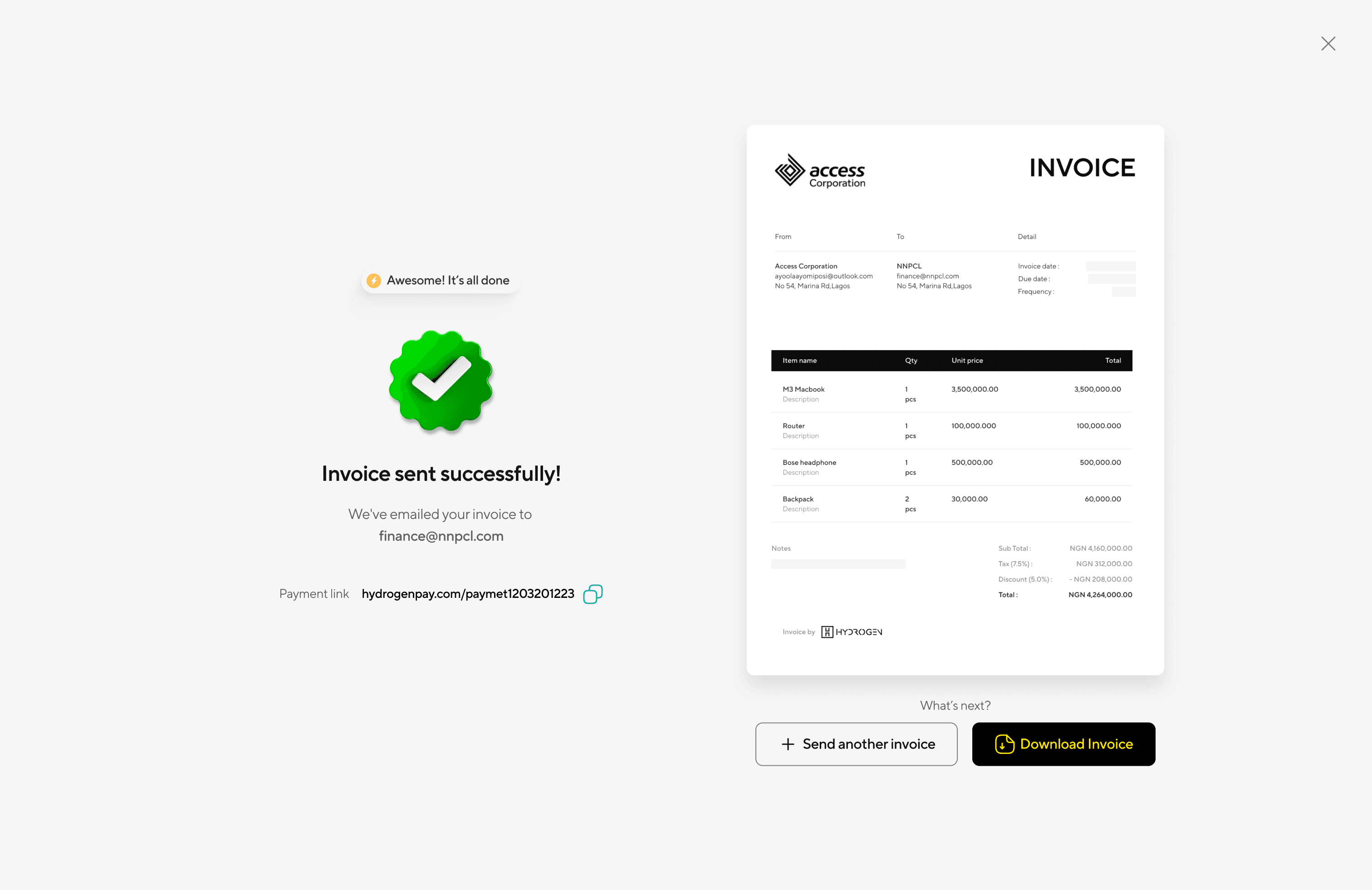
Invoice Sent Confirmation Screen

Invoice Sent Confirmation Screen

• Success message with a checkmark animation for positive feedback.
• Create New Invoice” button for seamless workflow continuity.

• Success message with a checkmark animation for positive feedback.
• Create New Invoice” button for seamless workflow continuity.

10

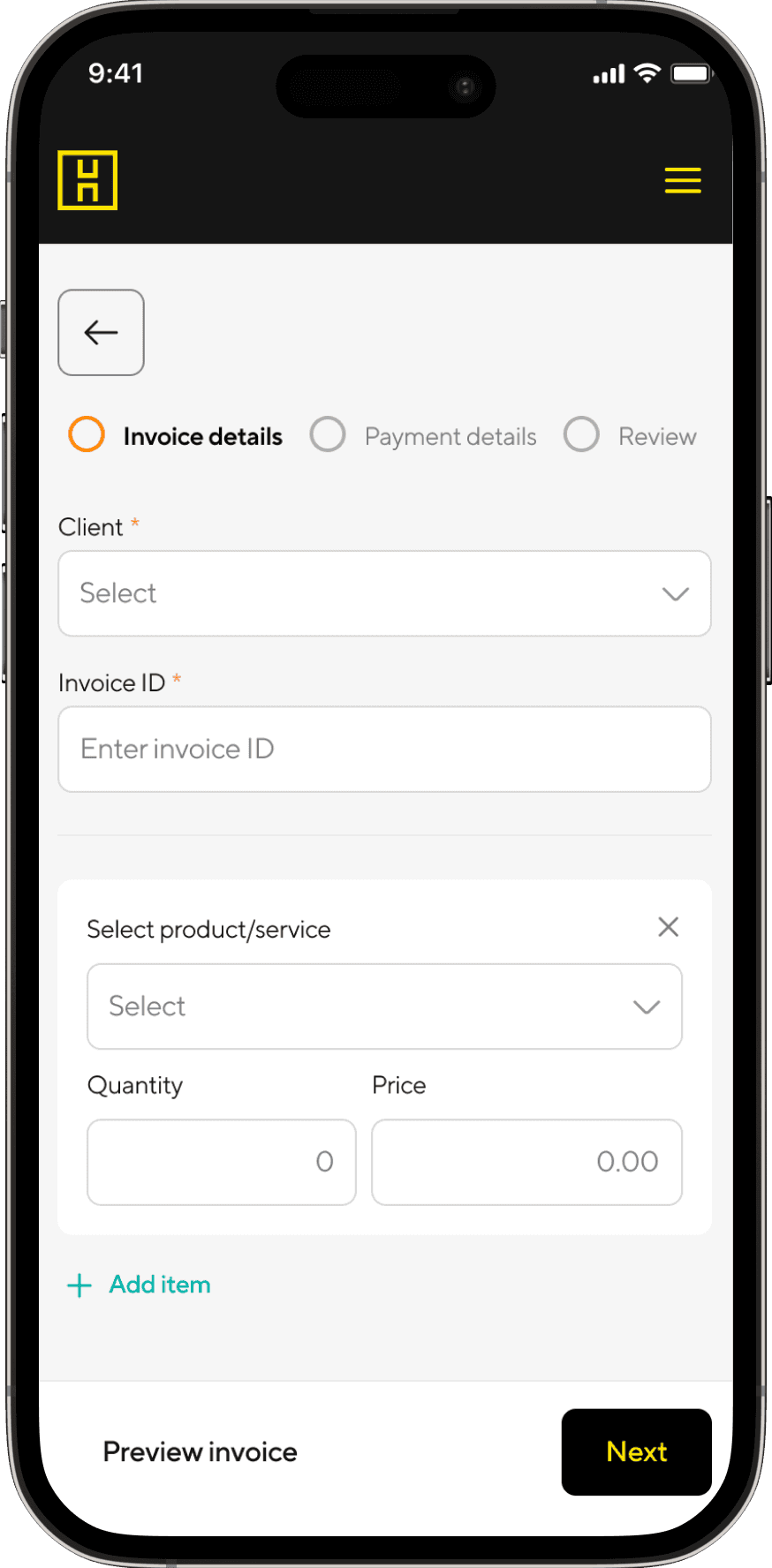
Mobile optimaization

Mobile optimaization

11

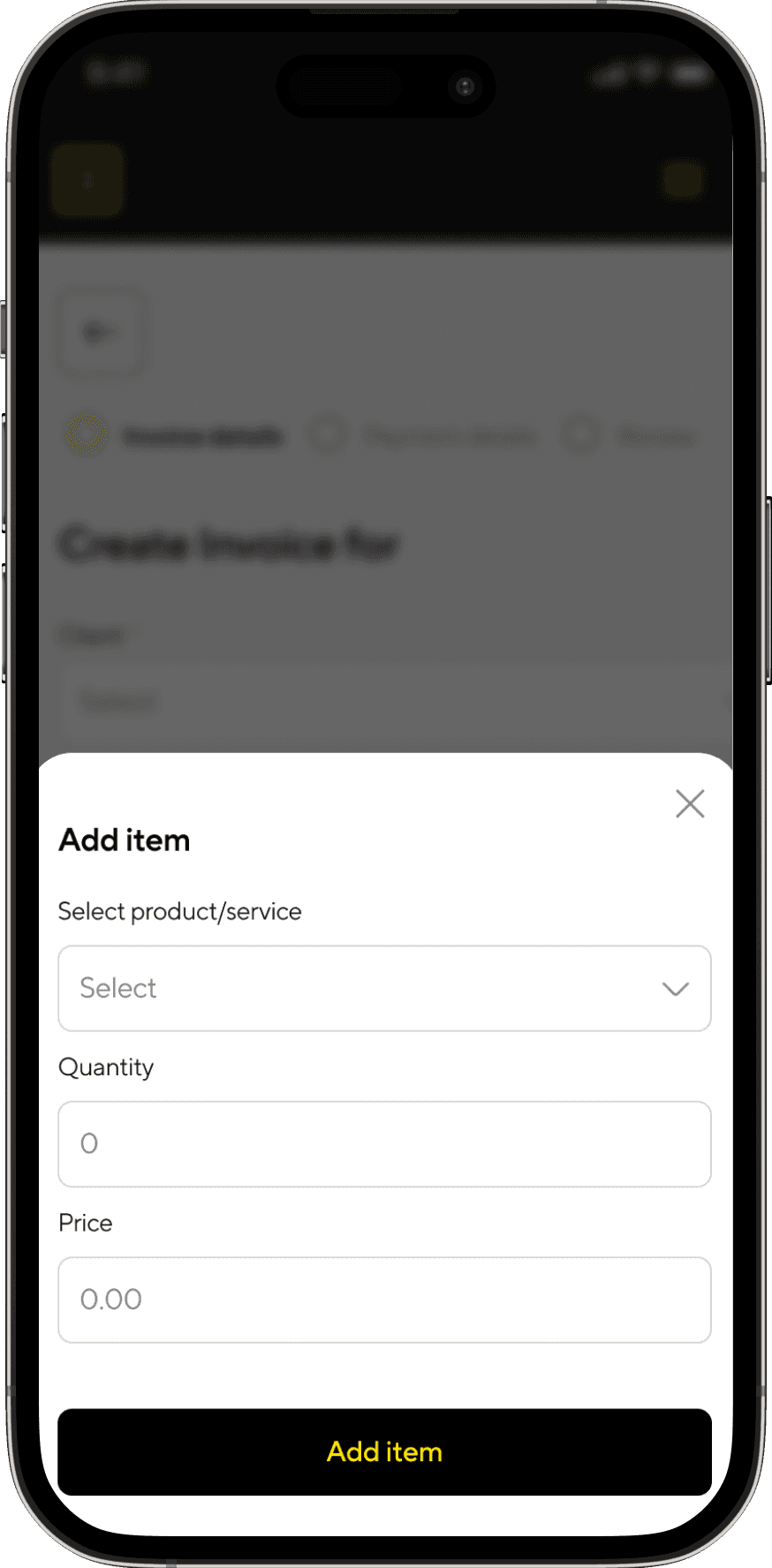
Mobile optimaization

Mobile optimaization

12

Prompt to spend wisely

Prompt to spend wisely

13

Setting up a budget

Setting up a budget

Challenges

User Testing for Validation

User Testing for Validation

We conducted two rounds of usability testing with 10 participants (freelancers, small businesses, and enterprise finance teams).

We conducted two rounds of usability testing with 10 participants (freelancers, small businesses, and enterprise finance teams).

Technical Challenges

Performance Issues with Auto-Fill for Large Customer Databases

Problem: Users expected instant suggestions when searching for customers and products, but slow queries caused delays.

Solution: Optimized database query performance and implemented caching to pre-load frequently used selections.

Problem: Users expected instant suggestions when searching for customers and products, but slow queries caused delays.

Solution: Optimized database query performance and implemented caching to pre-load frequently used selections.

Alignment Between Product, Design, and Engineering

Problem: Engineers wanted to reuse components from previous projects, but they didn’t fully fit the new streamlined invoice flow.

Solution: Worked closely with engineering to balance reusability and customization, ensuring design integrity without unnecessary development work.

Problem: Engineers wanted to reuse components from previous projects, but they didn’t fully fit the new streamlined invoice flow.

Solution: Worked closely with engineering to balance reusability and customization, ensuring design integrity without unnecessary development work.

Real-Time Invoice Preview Lag

Problem: It took time for entered details to appear in the real-time invoice preview, causing a frustrating delay.

Solution: Implemented lightweight live rendering techniques using asynchronous updates and optimized DOM rendering, ensuring near-instant preview updates without impacting performance.

Problem: It took time for entered details to appear in the real-time invoice preview, causing a frustrating delay.

Solution: Implemented lightweight live rendering techniques using asynchronous updates and optimized DOM rendering, ensuring near-instant preview updates without impacting performance.

User Challenges

Balancing Simplicity with Enterprise Needs

Problem: Users expected instant customer and product suggestions when typing.

Solution: Optimized the database query speed and used caching to pre-load frequent selections.

Problem: Users expected instant customer and product suggestions when typing.

Solution: Optimized the database query speed and used caching to pre-load frequent selections.

Ensuring Users Don’t Forget Key Details

Problem: Some users forgot to set due dates or payment notes, leading to delayed payments.

Solution: Added smart reminders and default due dates, with users able to adjust them as needed.

Problem: Some users forgot to set due dates or payment notes, leading to delayed payments.

Solution: Added smart reminders and default due dates, with users able to adjust them as needed.

Adoption Resistance from Existing Users

Problem: Some users were hesitant to switch from their current invoicing tools.

Solution: Created quick migration tools (importing customers/products from CSV) and an onboarding walkthrough to reduce friction.

Problem: Some users were hesitant to switch from their current invoicing tools.

Solution: Created quick migration tools (importing customers/products from CSV) and an onboarding walkthrough to reduce friction.

Lack of multiple sending options Shareable Link & attachment on social media)

Problem: Some users want to be able to share the invoice link accompanied with a PDF.

Solution: Create a button to enable user to share

Problem: Some users want to be able to share the invoice link accompanied with a PDF.

Solution: Create a button to enable user to share

Learnings

Learning can be a profound experience, and in this instance, it certainly was. once we completed the project, we entered beta testing to validate our assumptions. The testing phase progressed smoothly, requiring some fine-tuning, such as adjusting the date filter and decluttering the analytics module. This streamlined the presentation of pertinent data and facilitated clearer navigation for deeper insights.

Learning can be a profound experience, and in this instance, it certainly was. once we completed the project, we entered beta testing to validate our assumptions. The testing phase progressed smoothly, requiring some fine-tuning, such as adjusting the date filter and decluttering the analytics module. This streamlined the presentation of pertinent data and facilitated clearer navigation for deeper insights.

Solution

Design iteration and refinements

Initial

First Iteration : Invoice Sent Confirmation Screen

First Iteration : Invoice Sent Confirmation Screen

Success message with a checkmark animation for positive feedback.
Create New Invoice” button for seamless workflow continuity.

Success message with a checkmark animation for positive feedback.
Create New Invoice” button for seamless workflow continuity.

Refined

Second Iteration : Add multiple share options

Second Iteration : Add multiple share options

To enhance follow-ups, I added more social media sharing options based on user requests for greater flexibility in sharing invoice links.

To enhance follow-ups, I added more social media sharing options based on user requests for greater flexibility in sharing invoice links.

Initial

First Iteration :

First Iteration :

User testing revealed that some users rushed through the invoice creation process, often forgetting to set the issue and due dates. This led to delayed payments and a lack of urgency from their customers.

User testing revealed that some users rushed through the invoice creation process, often forgetting to set the issue and due dates. This led to delayed payments and a lack of urgency from their customers.

Refined

Second Iteration

Second Iteration

I decided to pre-fill these fields by setting the issue date to the current day and the due date to 30 days later. To validate this approach, I conducted a survey to establish the best business rule

I decided to pre-fill these fields by setting the issue date to the current day and the due date to 30 days later. To validate this approach, I conducted a survey to establish the best business rule

Initial

First Iteration : Smart alert to remind users to customize their invoice template.

First Iteration : Smart alert to remind users to customize their invoice template.

Refined

Second Iteration : Added friction to emphasis

Second Iteration : Added friction to emphasis

I introduced a modal in the invoice creation process to emphasize the importance of branding before users proceed with adding other details, ensuring they don’t overlook this step.

I introduced a modal in the invoice creation process to emphasize the importance of branding before users proceed with adding other details, ensuring they don’t overlook this step.

Initial

First Iteration : Invoice Data Table

First Iteration : Invoice Data Table

Tabular layout with columns for Invoice #, Client Name, Status, Amount, Due Date, Actions.
Status indicators with color coding:

Tabular layout with columns for Invoice #, Client Name, Status, Amount, Due Date, Actions.
Status indicators with color coding:

Refined

Second Iteration : Added more quick actions

Second Iteration : Added more quick actions

I added more quick actions to streamline the user workflow, making essential tasks more accessible and efficient.

I added more quick actions to streamline the user workflow, making essential tasks more accessible and efficient.

Impact & Results

By optimizing the invoicing process, we not only improved usability but also contributed to direct financial benefits for usershelping them get paid faster, reduce errors, and improve revenue tracking

40% faster invoice creation time compared to existing tools.

30% fewer invoice errors due to auto-fill and validation checks.

42% of merchants have used this invoicing tool, leveraging it for seamless billing.

Over 7,000 invoices have been sent, marking a record-breaking engagement rate.

Generated over 820 million Naira in transaction volume over the past 4 months, showcasing its financial impact.

Higher adoption rates among SMEs and businesses switching from competitors.

Reduction in operational costs for businesses by minimizing manual invoice tracking and follow-ups.

Faster invoice-to-payment cycle enabled businesses to get paid 2x quicker compared to manual invoicing proces

15% increase in successful transactions as invoices were sent to the right recipients with multi-recipient email support.

Conclusion

Conclusion

By prioritizing efficiency, flexibility, and user experience, we created an invoicing system that streamlines financial workflows for businesses of all sizes. This case study demonstrates my problem-solving approach, user-centered design process, and ability to balance business needs with usability.

By prioritizing efficiency, flexibility, and user experience, we created an invoicing system that streamlines financial workflows for businesses of all sizes. This case study demonstrates my problem-solving approach, user-centered design process, and ability to balance business needs with usability.

Ready to create something
awesome together?

Ready to create something
awesome together?